ESP · 8 min read · 2026-09-30
See Every Threat First with Wardogs ESP
How box, skeleton, health, distance, weapon, and vehicle ESP help you read a WARDOGS control zone without filling the screen.
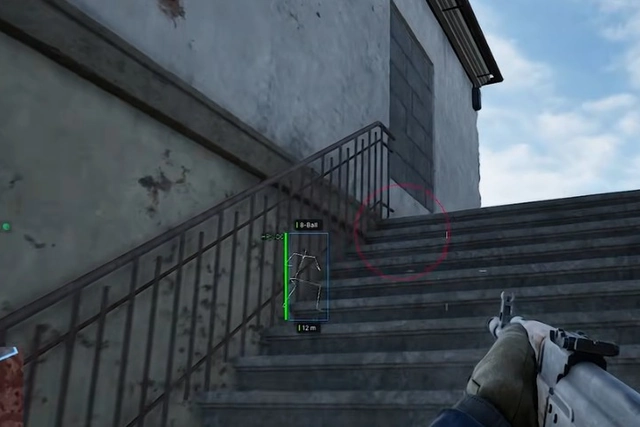
What Wardogs ESP is for
Wardogs ESP is a set of visual overlays for WARDOGS on Windows PC. It is built to show players and vehicles that would otherwise be hidden by terrain, buildings, or smoke.
WARDOGS control zones sit inside larger maps. Infantry can hold a compound while armor approaches from a road you are not facing. ESP is there to make that information visible, not to replace the 2D radar.
Player visuals
Box ESP outlines a player so you can judge position through cover. Skeleton ESP adds stance and facing, which helps when someone is prone behind a ridge.
Health ESP, distance ESP, and weapon ESP add context. A full-health rifleman at 20 meters is a different fight from a weakened player at 200 meters.
Choose labels that change a decision
Health and distance are useful when they affect whether you push, hold, or rotate. Weapon labels help when the loadout changes the risk of crossing open ground.
Hide any label you do not act on. A smaller visual set is faster to read during a crowded control-zone fight.
Vehicle ESP
Vehicle ESP marks transports and armor through terrain. In a three-team warfare match, a truck on the next road can decide whether you hold or rotate.
Pair vehicle ESP with radar vehicle markers if you need both a world overlay and a top-down plot. Keep draw distance short if the map feels noisy.
Keep the overlay usable
Turn groups on one at a time. If box ESP already explains a compound, you may not need every skeleton line at once.
For the current menu list and Elytra status before a match, check Wardogs cheats on the store page.
Match ESP range to the battlefield
Short visual range is easier to read inside compounds and around the active zone. Longer range can help on open routes, but distant boxes and labels may cover targets that matter now.
Change range before adding more label types. If the screen is still crowded, keep box and health ESP, then remove weapon or skeleton details until each marker has a clear purpose.
Use 2D radar for off-screen direction instead of extending every ESP label across the map.
Ready for Wardogs cheats?
Check live Elytra status, then buy ESP, aimbot, and 2D radar for WARDOGSon buywardogscheat.org. Need help? Read support or player reviews. Own the game via the official site.
Community replies
Discussion prompts based on common player questions.
ProneLine
Sep 30, 2026
Skeleton ESP is what showed me people lying behind the berm. Boxes alone looked like empty cover.
TruckWatch
Sep 30, 2026
Vehicle ESP at short range is enough. Max distance just painted the whole valley.
AmmoCount
Sep 30, 2026
Weapon ESP stopped me from peeking a DMR with a close-range SMG. Distance labels helped too.
SmokeHill
Sep 30, 2026
I keep health ESP on and skeleton off during night fights. Less clutter when everything is already dark.
LabelFilter
Sep 30, 2026
Weapon labels are useful on open ground, but I hide them inside compounds. Box, health, and distance are enough there.
Frequently asked questions
What ESP options are in the WARDOGS menu?
Box ESP, skeleton ESP, health ESP, distance ESP, weapon ESP, and vehicle ESP. Each one can be toggled on its own.
Is ESP the same as 2D radar?
No. ESP draws information in the world view. Radar plots markers on a top-down display. Most players use a short radar range plus a small ESP set.
Which ESP should I enable first?
Start with box ESP and health. Add distance and vehicle ESP next. Turn on skeleton and weapon labels if the fight still feels unclear.
Why does vehicle ESP matter in WARDOGS?
Matches include combined-arms movement. Armor and transports can reach a control zone from roads you are not watching.
How do I reduce ESP clutter?
Shorten visual range and start with box plus health ESP. Add distance, skeleton, weapon, and vehicle labels only when each one changes a match decision.